PIC24FJ256GU406-I/MR
PIC24FJ256GU406-I/MR orders should retain the GU device, industrial option and MR package. Resolve blank or programmed supply, configuration bits and accepted silicon revisions before the lot reaches assembly.
Keep the PIC24 programming brief.
- Device
- PIC24FJ256GU406
- Order option
- I/MR
Ordering and acceptance reference · supply confirmed by quotation
Keep every ordering field in the comparison.
Select a code segment, then compare the offered identity with the released BOM. The source references below establish ordering context, not live availability.
| Order / record | What it means | Before you accept |
|---|---|---|
| GU versus related family names | The manufacturer family includes different peripheral combinations. | Use the exact GU406 target, particularly where USB is used. |
| I/MR | The full code is listed in the manufacturer’s affected-parts record. | Confirm both grade and package rather than accepting an abbreviated quotation. |
| Configuration bits | Programming is more than loading the application bytes. | Supply the approved configuration and required blank/programmed condition. |
Resolve the decision behind the shortage.
Choose the situation that applies to your order. Each one changes what purchasing, engineering and the test owner need to agree.
Keep the same target through assembly.
Confirm PIC24FJ256GU406-I/MR and the accepted carrier. Ask whether mixed lots or a partial pack can be received before agreeing the quantity for the next assembly run.
Full code, first useful quantity and lot policy.
Name configuration and protection settings.
Provide the image revision and configuration-bit instruction. Agree who may change code-protection settings, how verification is recorded and whether samples are returned blank or programmed.
Image, configuration bits and sample disposition.
Exercise the functions in your product.
The GU family context does not prove your application works. Have the firmware owner define startup and the USB, display or other interfaces actually used, with the approved silicon revision and applicable errata.
Board revision, peripheral test and accepted revisions.
Read the fields. Keep the device context.
Explore this supplied USB5744 distributor label. It belongs to a different device; use the offered lot’s own label to establish identity and handling requirements.
For PIC24FJ256GU406-I/MRUse this lot’s PIC24FJ256GU406-I/MR label and top mark to confirm identity. The USB5744 example teaches manufacturer/distributor code separation, not this PIC24’s moisture classification.
Distributor packaging label
Microchip
USB5744BT-I/2GX01
Select a marker on the image or a number below. Each field answers a different purchasing question.
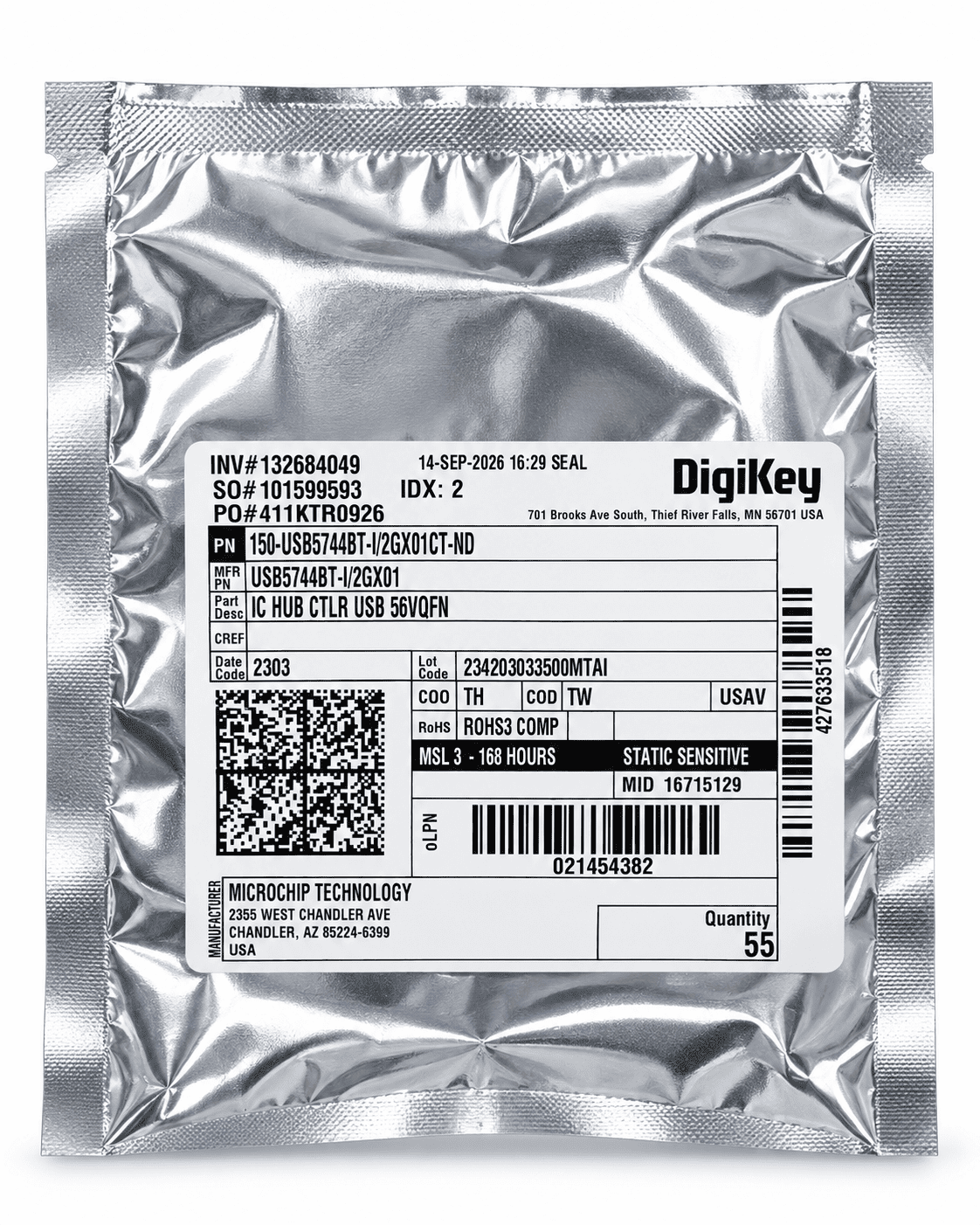
Manufacturer versus distributor code
MFR PN is the Microchip identifier. The longer PN above is a distributor catalogue code and includes its own fulfilment suffix.
Lot and date
The date and lot occupy separate fields. Keep both when asking for one-lot material or checking whether a split shipment meets your receiving rules.
Seal timestamp
This is the distributor’s seal record. It does not establish the silicon manufacturing date or the entire storage history.
Moisture handling
This USB5744 pack states MSL 3 and 168 hours. Use the requested device’s own package classification and applicable handling conditions; these values do not transfer to another device.
Pack quantity
The illustrated distributor pack carries its own quantity. A distributor cut-tape count is not the manufacturer’s standard full-reel quantity.
For this USB hub, retain /2GX01 and confirm the accepted carrier, lot and moisture-handling record.
Discuss this requirement ↗Agree the acceptance brief before testing.
Identity, unused condition and the complete order code are essential. Your device’s programming, assembly and operating requirements still need their own checks.
Exact identity
Reconcile GU406-I/MR between BOM, pack label and top marking. Compare the package to the correct drawing before assembly.
Programming record
Document device target, image and configuration bits for the identified samples. A verify result does not resolve an incorrectly specified package or grade.
Functional approval
Use the customer’s board and test sequence for startup and required peripherals. Agree feasibility, limits and the engineering owner before committing the test.
Agree the lot, sample count, method, fixture, limits, report and sample disposition. Electrical or specialised analysis depends on laboratory feasibility; it is not implied by an external visual inspection.
Put the test brief before the sample.
The laboratory workflow starts with the question to be answered. Agree how samples are identified, which operations may change them, and who reviews the findings. The photograph illustrates that workflow, not the status of an offered lot.
Explore inspection reportsSupport the board already in service.
A targeted component purchase can support your existing EMS or repair team. Keep the released board, programming baseline and receiving requirements together while sourcing the missing line.
Plan an OEM / EMS shortage purchaseInstrument and control manufacturers
A single MCU shortage may hold a board that already has approved firmware and an established assembly route.
Service and production top-ups
The useful buying decision is preserving the configured application while filling the missing material line.
Send the requirement your board needs.
ICstoq reviews our inventory and established China supply relationships against the complete order code, quantity, required arrival date and destination. The quotation confirms the offered lot, inspection scope and delivery terms.
Send your enquiryInclude these details
- PIC24FJ256GU406-I/MR, carrier and lot policy
- Firmware, configuration bits and blank/programmed requirement
- Accepted revisions, board startup and required peripheral checks
Identify fixed requirements and any alternatives already approved by your engineering team. We agree feasible inspection work and sample acceptance before proceeding.